If you need ''the right information in the right place at the right time with the right cost in order to support the right decision''[1] from , the data warehouse comes into play. So what does right information mean? The knowledge workers, like accountants, project managers and data analysts, need a support to make decisions and data warehouse provide such a support for all types of knowledge workers on the same data.
How do the developers manage to use same data and support different tasks? I know two classical approaches to design a data warehouse: top-down and bottom-up approaches. In the top-down approach [2], all the data and its statistics are stored and parts of it are copied in data marts (pieces of data) for the further use. The approach is time-consuming and costly as by designing a data warehouse model one have to reconcile structure of sources. The bottom-up approach [3] is less costly and focus on creating rapid solutions with less redundant data and small data marts. But the approach consider just one or a few tables that are fact tables and include integrated data from data sources while all other data land in data marts. The flaw of the bottom-up approach lies in its inflexibility according to the changes of requirements of data warehouse users.
How do the developers manage to use same data and support different tasks? I know two classical approaches to design a data warehouse: top-down and bottom-up approaches. In the top-down approach [2], all the data and its statistics are stored and parts of it are copied in data marts (pieces of data) for the further use. The approach is time-consuming and costly as by designing a data warehouse model one have to reconcile structure of sources. The bottom-up approach [3] is less costly and focus on creating rapid solutions with less redundant data and small data marts. But the approach consider just one or a few tables that are fact tables and include integrated data from data sources while all other data land in data marts. The flaw of the bottom-up approach lies in its inflexibility according to the changes of requirements of data warehouse users.
In the top-down approach you extract the data, cleaned it, transformed it according to your schemata and uploaded into the global warehouse. You can use some pieces of the data for some statistics (in Operation Data Store for example) but generally all data you need to use for the applications (Data mining, Data visualization, Planning, Prediction) you copied in additional data marts. A good example of this design is taken from http://datacommanders.com/
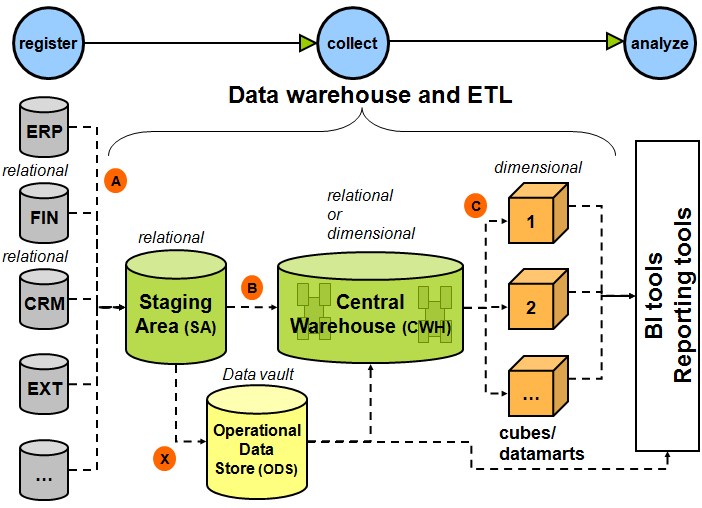
In the bottom-up approach after the extraction and transformation of the data, you store it in global warehouse as following: one or several fact tables and its dimensions - so global warehouse information model looks like a star.
A good example of it taken from the www.databaseanswers.org

[2] William H. Inmon(1996). Building the Data Warehouse. John Wiley & Sons, ISBN
[3] Ralph Kimball (1996). The Data Warehouse Toolkit. Wiley.
